The Setup is the foundation beneath our five ways of working: Figure It Out (Figure It Out is one of our five ways of working: turn uncertainty into a decision you can act on.), Build It (Build It is one of our five ways of working: build what does not exist yet, around the way your work actually happens.), Fix It (Fix It is one of our five ways of working: make sense of what is there and find a sensible path back to something dependable.), Teach It (Teach It is one of our five ways of working: tools that fit your people, and a team that can operate them.) and Own It (Own It is one of our five ways of working: someone who stays on and sees how the pieces fit.). For most clients, the work starts here, with one of the three packages. All solutions at a glance
Setup
An AI setup with a clear scope and price.
We set up AI where your team enters details twice, with a documented handover.
An interview in five levels, then a free call with Jules. You decide whether a package fits.
The interview is free and needs no account. You can stop any time and continue later, on another device too.
Fig. 03 / Four steps, one pathFrom the interview to a package
01
Free · no account
Interview, levels 1 and 2
Five short questions to start, then up to ten about one recurring task: your software, the effort, how you measure success. Pick an answer or say it in your own words.
Your result
Your first report: we email you a link that opens it. As a PDF, it goes to your confirmed address when you ask.
02
Free · as far as you like
Interview, levels 3 to 5
The next questions are tailored to you: from level 3 an AI model (A language model is the actual AI behind an AI assistant: it has learned from a great deal of text and writes an answer to an input.) orders them to fit your answers, from level 5 it writes new ones from your own words. Without the model, a fixed order applies.
Your result
Updated versions of your report, whenever you like. Every further answer makes it more precise.
03
Free · 20 minutes
Talk to Jules
Book a slot directly on the contact page, or choose ‘Talk to Jules’ in the interview and leave an email address or phone number.
Your result
You resolve open questions and discuss what the package would need to cover.
04
One-off setup price
Your package
The scope and setup price are in the written quote before work starts. At the start we record one figure you choose and measure it again at the review. Then we install the agreed workflow (A workflow specifies what information goes in, what happens to it and who checks the result.) and hand it over.
Your result
You receive a documented setup. Two weeks after handover, we check together whether the workflow works in day-to-day use.
Sample report
Where you stand
Invented example: a fiduciary office that does not exist, after level three of the interview. Here are the first two pages.
The short version: what matters most in your answers and the key facts of your task
Where it pays to start, each with a first step
Assumptions and open questions, named openly
The three packages, and where they fit
Open the sample reportSample based on invented answers, not a client case
Four examples: what AI prepares and who checks it.
These are possible workflows, not client cases. Your report from the interview shows where it pays to start for you.
Each example in four steps
01Input
02What AI prepares
03Who checks and approves
04Output
AccountingExample
Supplier invoices
Input
Suppliers email invoices as PDFs.
What AI prepares
AI extracts the supplier, amount and due date, compares the details with the purchase order and prepares a payment file. It flags possible duplicate invoices and any IBAN that differs from the one on file.
Who checks and approves
An authorised person checks the invoice, order and payment file before approving the accounting entry and payment. They verify changed bank details using a phone number already on record.
Output
A prepared payment file and filed invoice records.
Logistics and forwardingExample
Customs instructions from an arrival notice
Input
An arrival notice may arrive by email, as a PDF or as an Excel file. The layout varies by sender.
What AI prepares
AI reads the container number and reference, matches the notice to a shipment and drafts customs instructions. It flags details it cannot find.
Who checks and approves
Someone in dispatch completes the flagged fields and checks the draft before sending it to the customs agent.
Output
The checked instructions and arrival notice are filed with the shipment’s documents.
FiduciaryExample
Check for missing client documents
Input
A fiduciary office receives client documents by email, as photos and on paper. The paper documents are scanned.
What AI prepares
AI compares the documents received with the previous year’s file, flags possible gaps and drafts a request to the client.
Who checks and approves
The person handling the client’s file checks the list, removes anything already resolved and approves the request before it goes to the client.
Output
The request is approved, with a list of documents that may still be missing.
A new deal involves named companies and individuals.
What AI prepares
AI looks for possible matches on SECO sanctions lists and shows where it found them.
Who checks and approves
A responsible person examines possible matches and decides what happens next.
Output
A screening record showing the findings and decision.
A command or an incoming email can start the workflow. We agree where it will run before installation. The quote states which systems we connect and whether results go to your existing software or the vault (The vault is a folder of your working files on your computer; we create it from the vault template.).
From our work
What already runs.
A project at Synsol AG, an anonymised client project and our platform (The AI agents we build for your firm run on our platform. We host the platform in Switzerland; external models may process data elsewhere.). We give the source for each figure.
Our co-founder’s firm
An owner’s desk: invoices, deals and the inbox
The checklist for a sea import has 34 steps. The agent may handle 23.
Synsol AG is a Swiss commodity trading firm run by our co-founder Ole. There, AI agents (An AI agent carries out several steps of a defined task. A person decides before it sends anything outside your firm or spends money.) assist the owner with his inbox, supplier invoices and trades. They run on his computer, alongside the firm’s existing databases and mailboxes.
Supplier invoices move from email to a payment file for the bank. They are not booked until the owner approves them.
A person still takes out the insurance and checks whether payments have arrived.
Each database change is logged line by line. Both databases are backed up hourly during the working day.
Built between 11 February and 24 March 2026. The owner uses the desk daily for the firm’s trading administration.
Step counts from the deal checklists in the code, March 2026.
Client project, anonymised
A company website, rebuilt
A website in four languages that the firm can update itself
Product pages show what the firm offers. A three-step quote request collects the details the sales team needs to prepare a quote.
The site assistant replies in text or by voice. If a conversation suggests a potential customer, a model summarises and scores the enquiry, then emails the details to the firm.
We replaced seventeen stock photos with images that fit the firm’s style.
We built and launched the site between 5 February and 30 March 2026.
The 117 commits are recorded in the project’s version history, 5 February to 30 March 2026.
Our platform
The platform behind our setups
Tasks, documents and AI agents in one place. A person decides which messages go outside your firm and what money is spent.
With Pro Setup (Pro Setup is our recommended package at CHF 1'490.–: vault, workflows with AI agents, first integrations, an introduction session and three months of Business seat.) and Operator System (Operator System is our package for teams at CHF 3'500.– to 5'000.–: the shared base with workflows for the team and connected systems.), the Business seat (The Business seat is one person’s access to our platform (open alpha); Pro Setup includes three months, and with Operator System it is six per person.) for the platform is included for the first months. After that it costs CHF 199.– per person per month (CHF 169.– billed yearly) if you keep using it.
Each AI agent has its own task and can work alone or with other agents. Every run is logged.
When you ask about your documents, the platform shows the passages supporting its answer.
Before an agent sends a message outside your firm or spends money, a person must approve the action.
The log (A log records what a program or an AI agent did and when, so that afterwards you can trace who triggered what and what happened.) records requests and changes. For each change, it shows the state before and after.
We use the platform ourselves. It is still in open alpha (Open alpha means the platform is at an early stage: we use it ourselves, and it changes all the time.).
According to the release log of 30 September 2026, 2,616 tests passed and none failed. They cover 52 per cent of the code.
All three projects are described on jules.solutions. We name clients only with their consent.
Compare what we install and what may cost extra after handover. Your report from the free interview shows which package fits your work, and we recommend it before you enquire.
Before work beginsYour quote lists what you get and the one-off setup price.
PriceWhat we set upWhat you can do with itIncludedOutside the setup pricePeople and devices within the scopeDelivery method and expensesTime to handoverResponse times for follow-up support and support agreementsPossible costs after handoverAfter handover
Basic Installation
For SMEs that want to try one or two AI workflows on their own machine.
We install an AI harness (An AI harness is the workspace on your computer in which AI reads files and carries out agreed steps.) and set up one or two basic workflows on your machine. The handover document (The handover document records what we set up, how you work with it and how you back it up and restore it.) records what we installed.
What you can do with it
You start the installed workflows yourself and check what AI has prepared.
Included
We install an AI harness; Claude Code (Claude Code is an AI harness made by Anthropic: it runs on your computer, reads files and carries out steps you describe in plain language.) is one option.
A short walkthrough at handover: we show the person using the setup how to work with the AI harness and start a workflow.
You get a template (A template is a prepared structure, for a document, an email or a folder for example, which you only complete for each case.) for a vault: a folder for working files on your machine.
We set up one or two basic workflows you can start yourself.
Your handover document lists what we installed and how to start using it.
Outside the setup price
We don’t connect your existing systems in this package.
A separate introduction session (In the introduction session, you practise on your own documents how to start the workflows we set up and how to check the results.) and ongoing support (A retainer is a separate agreement for support after the included follow-up support, at CHF 500.– to 2'000.– per month.) after handover are not included.
People and devices within the scope
One person on one device
Delivery method and expenses
Remote installation, always from Switzerland; visits and expenses set out in the quote
Time to handover
About 1 day; date fixed in the quote
Response times for follow-up support and support agreements
Only under a support agreement: first response within 2 hours, handling starts within 24 hours
Possible costs after handover
No Business seat included
Model usage (Model usage means accessing an AI provider’s language model. The cost is not included in the setup price.): charged according to use through your provider account
Support: a separate agreement if you want it, CHF 500.– to 2'000.– per month
After handover
Two weeks after handover, we check how the workflows are working in daily use. You then carry on using them yourself.
Recommended
Pro Setup
For SMEs whose staff repeatedly copy details from emails and documents by hand.
CHF1'490.–
One-off fixed price
Business seat3 months included, thenCHF 199.– per person per monthbilled monthlyCHF 169.– per person per monthbilled yearly: CHF 2'028.– a year
We set up a vault for working files on your machine, install workflows and connect your existing systems within the agreed scope.
What you can do with it
For the installed workflows, AI prepares details from emails and documents so your staff can check them instead of copying them out again.
Included
We prepare your device and install the chosen AI harness and required software, with your IT partner’s approval when required.
We set up your vault, our platform and workflows using AI agents. We connect existing systems within the agreed scope.
We set up a structure for your project files, provide templates and add three to five commands (A command starts a defined workflow. In Pro Setup, we set up three to five commands for your work.) to start workflows.
In an introduction session, you practise starting the workflows and checking the results on your own documents. The person who will use the setup and whoever approves the results should attend.
Your handover document lists what we installed and how to start using it.
One Business seat for one person is included for three months, or six with Operator System. One Business seat covers one person and their main device, plus their phone and a shared drive. On the phone, they use the setup through our app, and with Operator System also through the messenger service of your choice. Our platform is in open alpha.
Outside the setup price
Pro Setup covers one person on one device. Additional people and team workflows are not included.
Support after the 30 days: a separate agreement if you want it, CHF 500.– to 2'000.– per month.
People and devices within the scope
One person on one device, with one Business seat
Delivery method and expenses
Remote installation, always from Switzerland; visits and expenses set out in the quote
Time to handover
About 1 to 2 weeks; date fixed in the quote
Response times for follow-up support and support agreements
First response within 2 hours, handling starts within 24 hours
Possible costs after handover
Business seat after the included three months: CHF 199.– per person per month, or CHF 169.– a month billed yearly, which is CHF 2'028.– a year
Model usage: charged according to use through your provider account
Support after 30 days: a separate agreement if you want it, CHF 500.– to 2'000.– per month
After handover
30 days of follow-up support (Follow-up support means that questions and adjustments by email and phone are included for 30 days (Pro Setup) or 60 days (Operator System) after handover.) are included: questions and adjustments by email and phone.
Operator System
For businesses that work with a team and want existing systems included.
CHF3'500.–to 5'000.–
Paid once; the quote fixes the price before work starts. We recommend one Pro Setup per person with it, at CHF 1'490.– each.
Business seat6 months included per person, thenCHF 199.– per person per monthbilled monthlyCHF 169.– per person per monthbilled yearly: CHF 2'028.– a year
We set up workflows for several people and connect existing systems within the agreed scope.
What you can do with it
Your team uses the installed workflows with its existing software and checks what AI has prepared.
Included
We set up the shared base for your team, built from the same parts as Pro Setup and adapted to your team’s work, with an introduction session for your team. Everyone who will use the workflows should attend, with the person who looks after the setup.
We set up workflows for one person or for the whole team, with commands to start them.
Each person works in their own vault; the team shares a project repository (A Git repository is storage for files that records every change with its date and author; GitHub is a well-known service for it.).
We connect the agreed systems and document the setup at handover.
We connect the messenger service of your choice.
Everyone on the team who works with the system needs at least a Business seat, plus a Pro Setup if they would rather not do the setup themselves. One Pro Setup per person is recommended, not required. With Operator System, each person’s Business seat is included for six months instead of three. The quote states the number of people. Our platform is in open alpha.
Outside the setup price
Licences for your existing software are not included.
Support after the 60 days: a separate agreement if you want it, CHF 500.– to 2'000.– per month.
People and devices within the scope
Operator System as the shared base for a team. Everyone needs at least a Business seat; one Pro Setup per person is recommended. The written quote states how many people are covered.
Delivery method and expenses
Remote work, always from Switzerland, or on-site work; expenses set out in the quote
Time to handover
About 3 to 6 weeks; date fixed in the quote
Response times for follow-up support and support agreements
First response within 2 hours, handling starts within 24 hours
Possible costs after handover
Business seat after the included six months: CHF 199.– per person per month, or CHF 169.– a month billed yearly, which is CHF 2'028.– a year
Model usage: charged according to use through your provider account
Support after 60 days: a separate agreement if you want it, CHF 500.– to 2'000.– per month
After handover
60 days of follow-up support are included: questions and adjustments by email and phone.
For more than one personPro Setup covers one person on one device and includes one Business seat. You can start with Pro Setup for one person. For a team, we recommend Operator System as the shared base, plus one Pro Setup per person. With Operator System, each person’s Business seat is included for six months instead of three. A team can start with the people who work in the chosen workflow. A Pro Setup for each additional person costs CHF 1'490.– once; from the seventh month, their Business seat follows at CHF 199.– a month, or CHF 169.– a month billed yearly. The worked example sets out the first-year costs for five people.
You pay for the setup once. If you continue using a Business seat after the included months, you pay for it monthly or yearly; yearly billing costs 15% less. Model usage and other licences may add to the cost of any package. Introductions run in German or English. If the setup does not match the written quote, we correct it at no extra cost, with no deadline. If something stops working because of a mistake on our side, in the setup or after an update of ours, we fix it at no cost and with no deadline. We are happy to fix problems caused by changes you or third parties make, such as a plugin you installed yourselves, at the hourly rate in your written quote, and only after your go-ahead.
What happens after your enquiry We confirm your enquiry within 2 hours and start working on it within 24 hours. After a few questions about your workflow, you get a binding written quote with scope and price; work starts once you accept. We recommend the interview before the quote, but it is not required.
Before work starts, you receive a binding quote for each package stating the scope, price, payment, acceptance and licence terms. You receive a licence to use the workflows, AI task instructions (A skill is a written instruction for a specific AI task, such as checking invoice details.) (skills) and commands we build; Jules Solutions retains the rights to them. Your data, files and provider accounts remain yours. More on your usage rights. Everything else is in our terms of business.
Not sure which package fits? Your report from the interview shows where each one fits.
Working files in the configured vault live on your machine. Inputs for a task may go to the model provider (An AI provider runs language models and sells access to them, for example OpenAI (ChatGPT), Anthropic (Claude) or Google (Gemini).). The interview asks about your software and where your data lives. We then examine which processing option fits.
Cloud model
Where processing happens
The chosen provider processes model inputs. An EU or Swiss region (For cloud providers, a region is the area where the data centres that process your data are located, such as the EU or Switzerland.) is an option only if the provider offers it for the chosen model.
Who processes the inputs
Your chosen model provider processes inputs through your account.
Suitable when
The necessary inputs may be sent to the provider, or you can remove confidential details first.
Cost and package scope
Possible with all three packages. Model usage may cost extra.
Does the provider use your inputs to train its models?
We host our own services and data, such as our platform, in Switzerland.
Who processes the inputs
Jules Solutions runs these services. Third-party providers, such as AI model providers, do not process inputs in Switzerland by default.
Suitable when
Your data in our services should stay in Switzerland. If a model should also run in Switzerland for a task, we settle that before work starts and record it in the quote.
Cost and package scope
Standard for our own services and data. For third-party providers only if the quote says so.
Local or hybrid
Where processing happens
Local processing runs a model on your hardware. In a hybrid setup (Locally, the language model runs on your hardware; in a hybrid setup the working files stay local and only the excerpts needed go to a cloud model.), working files stay local while a cloud model (The cloud means computers in a provider’s data centres on which programs run and data is kept, instead of on your own device.) receives the excerpts needed for the task.
Who processes the inputs
For local processing, the model runs on your hardware. In a hybrid setup, your chosen model provider also processes inputs.
Suitable when
You want to process confidential information locally and have suitable hardware. For a hybrid setup, we examine which excerpts reach the cloud model.
Cost and package scope
We quote local or hybrid processing separately.
The FAQ explains what not to put into the interview or an AI tool. It also sets out the access we need during setup. During setup, AI agents we direct may process content from your work. Before work starts, we record which content those agents may send to which providers. Which data we build and test with depends on the project, and the quote records that too.
We run remote sessions (With remote access, someone works on your device over the internet without being there, to set up a program for example.) on your devices only from Switzerland. At handover, we remove our access. Afterwards, change any credentials we used.
If your setup touches personal data you are responsible for, we sign a data processing agreement (A data processing agreement (DPA) sets out how a service provider handles personal data it receives on your behalf.) with you before work begins, as standard. Otherwise we sign one on request.
The privacy notice explains what happens to your answers in the interview.
Additional costs
Usage costs may come on top of the setup price.
You pay for the setup once. These items may follow. The examples below work through a first year.
Usage costs may come on top of the setup price.
Item
When
Amount
Setup
One-off
The agreed setup price, from CHF 490.–
Business seat
After its included months, if you keep it
CHF 199.– per person per month, or CHF 169.– a month billed yearly, which is CHF 2'028.– a year
Model usage and other licences
Ongoing
Charged according to use, through your provider account
Support
After handover, only if you want it
A separate agreement, CHF 500.– to 2'000.– per month
Your team’s time
During installation and handover
The quote states the expected time commitment
Example: Pro Setup in year one with a Business seat
Open the cost examples
A twelve-month calculation if you keep using the Business seat after the three included months. The written quote determines the actual terms.
Example: Pro Setup in year one with a Business seat
Item
Amount
Pro Setup, one-off
CHF 1'490.–
Business seat for the three included months
Included
Business seat if used for another nine monthsMonths 4 to 12: 9 × CHF 199.–, billed monthly.9 × CHF 169.– billed yearly. In month 4 we bill CHF 2'028.– for months 4 to 15; months 13 to 15 count towards year two.
CHF 1'791.–CHF 1'521.–
Usage of the chosen AI modelExamples of business plans for two or more people, as of October 2026, depending on plan and billing. ChatGPT Business: CHF 15.– to 19.–; Claude Team: USD 20.– to 125.–, each per person per month
Depends on the provider and plan; not in the total
Support after the included 30 days
Only if you want it, CHF 500.– to 2'000.– per month; not in the total
Total with Business seat, excluding model usage and other costs
CHF 3'281.–CHF 3'011.–
Invoiced in year one
CHF 3'518.–
Without renewal, access to the platform ends. Your working files remain in the vault on your machine. What keeps running without the Business seat depends on the setup; the written quote states it.
How many working hours would you need to save?
Open the cost examples
This calculation assumes an internal cost of CHF 90.– per working hour. It shows how many whole hours would cover the setup price; the two year-one rows for Pro Setup include the Business seat for the months of year one, so with yearly billing not the whole yearly bill. Model usage and other costs are excluded:
How many working hours would you need to save?
Package
Calculation
Break-even
Basic Installation
CHF 490.– ÷ CHF 90.–
at least 6 hours
Pro Setup
CHF 1'490.– ÷ CHF 90.–
at least 17 hours
Pro Setup in year one with a Business seat, billed monthly
CHF 3'281.– ÷ CHF 90.–
at least 37 hours
Pro Setup in year one with a Business seat, billed yearly
A worked example, not a quote: Operator System as the shared base plus one Pro Setup per person, for five people who keep their Business seats after the six included months.
Worked example: a team of five in year one
Item
Amount
Operator System as the shared base, one-off
CHF 3'500.– to 5'000.–
Pro Setup per person, one-off5 × CHF 1'490.–
CHF 7'450.–
Business seat per person, months 1 to 6With Operator System, six months instead of three.
Included
Business seat per person, months 7 to 125 people × 6 months × CHF 199.– with monthly billing.5 people × 6 months × CHF 169.–, billed yearly. In month 7 we bill CHF 2'028.– per person for months 7 to 18; months 13 to 18 count towards year two.
CHF 5'970.–CHF 5'070.–
Usage of the chosen AI model
Depends on the provider and plan; not in the total
Total with five Business seats, excluding model usage and other costs
CHF 16'920.– to 18'420.–CHF 16'020.– to 17'520.–
Invoiced in year one
CHF 21'090.– to 22'590.–
The range depends on the Operator System price. The written quote sets out the exact price, scope and number of people covered.
Before work starts, you receive a binding written quote with the scope and one-off setup price.Enquire about Pro Setup →
For external AI models, you can use an account in your company’s name with the provider. You then manage access and pay for usage through that account. If you prefer, we manage your account with the AI provider or provide API keys (An API key is a secret access code that lets a workflow use a service such as a language model.) where the provider’s licence allows it. We invoice you for the cost.
Some time from your staff for installation and handover; the quote states the expected time commitment.
Choose someone to look after the workflows after handover and collect reports of problems and requested changes.
Five ways to tackle work beyond the packages.
Not every task fits a package. We agree the scope of additional work and put the service and price in writing before starting.
Figure it out
‘We enter the same details twice. Where should we start?’
We follow the workflow from the first entry to approval (Approval means a person decides before an AI-prepared message goes outside your firm or money is spent.) and look for where the same details are entered twice.
Possible outcome A concrete next step for that workflow.
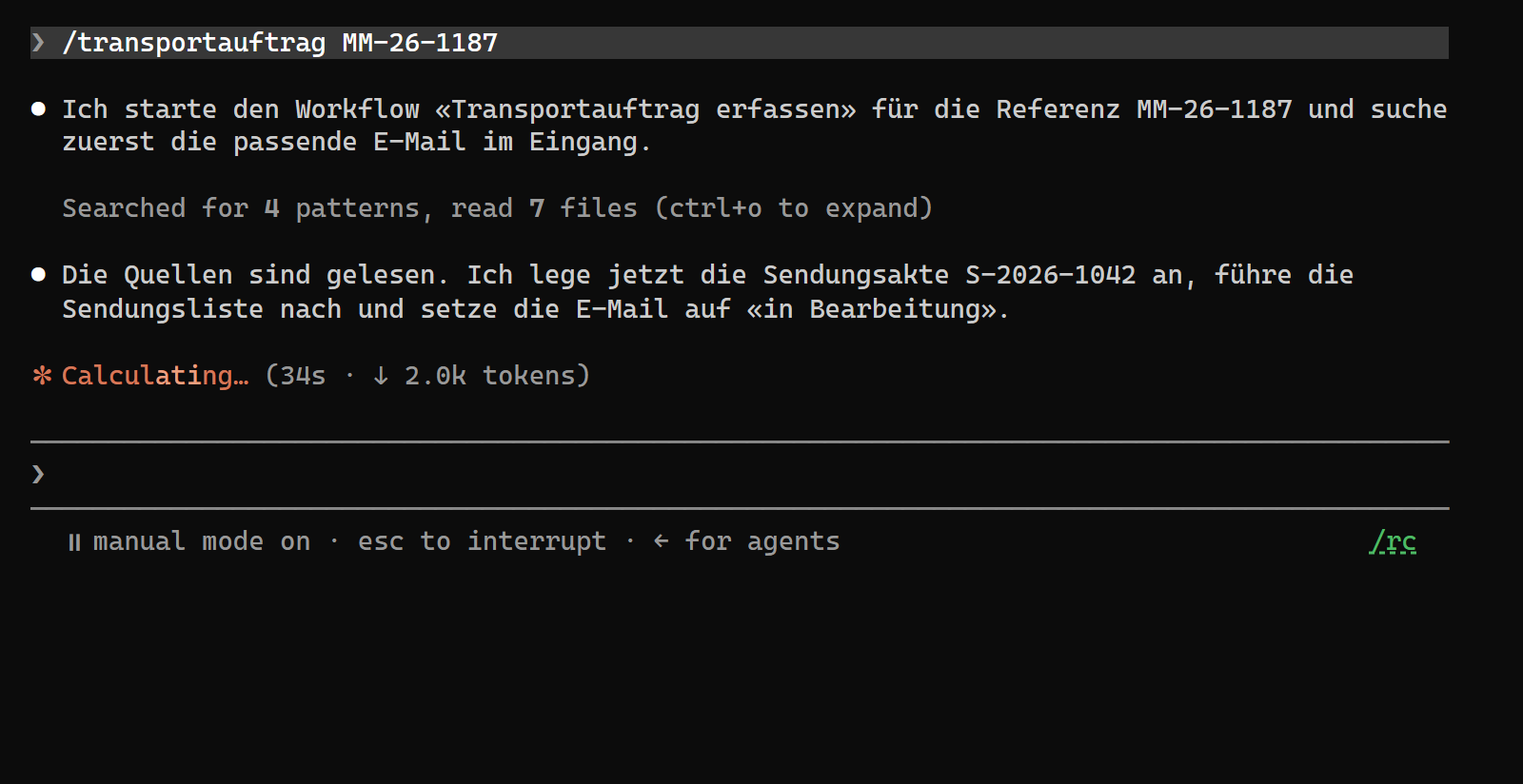
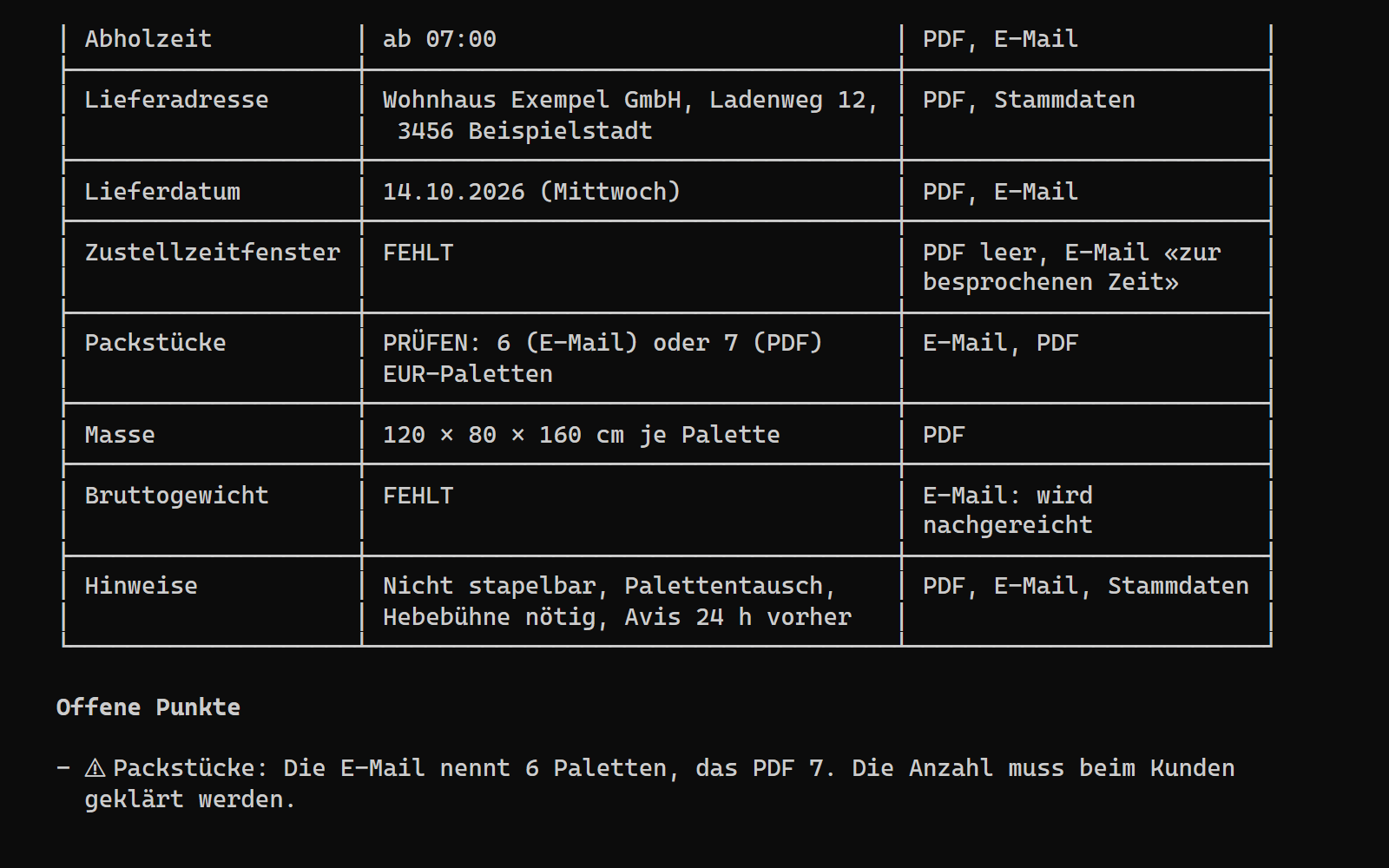
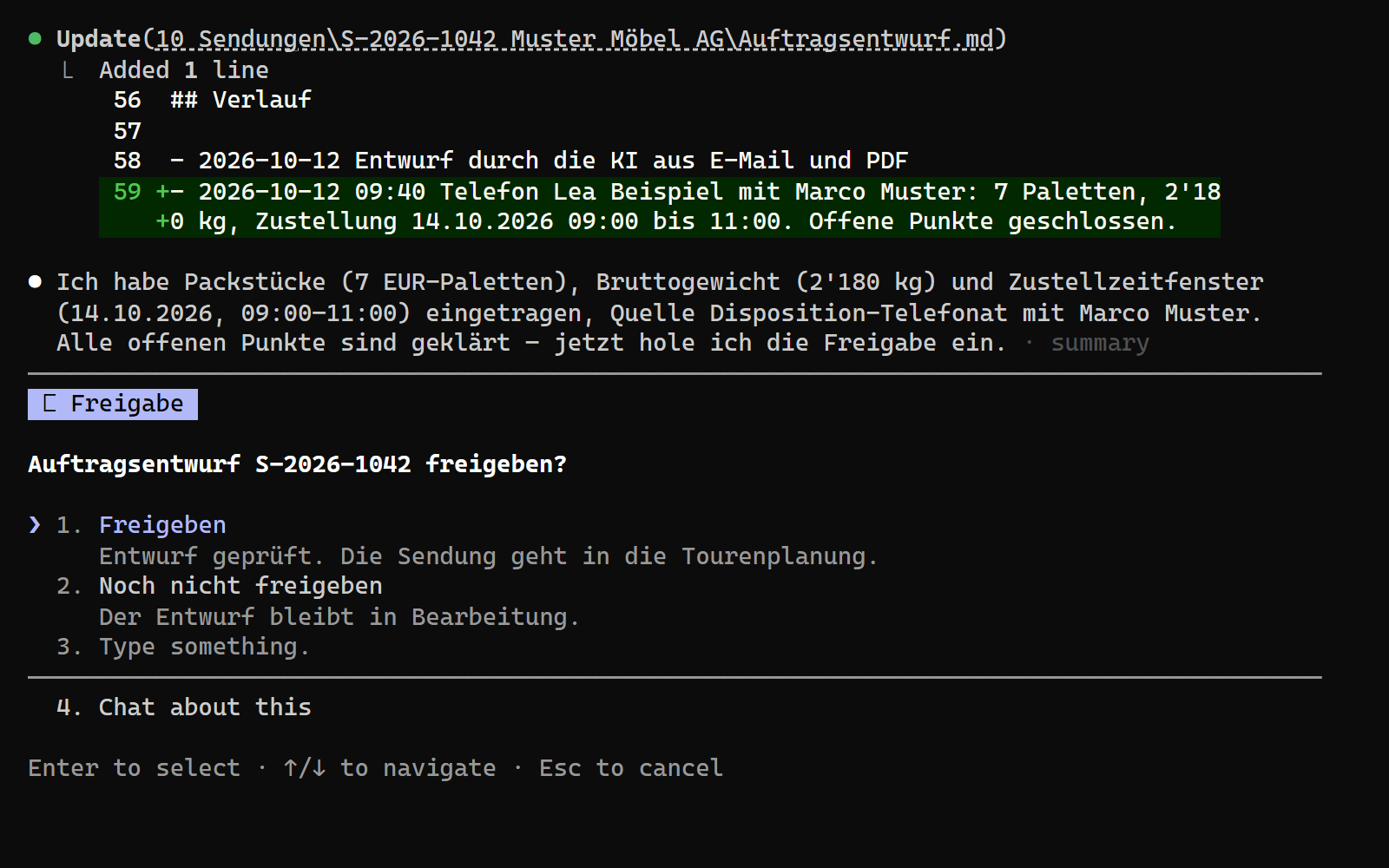
This is one example, here in Claude Code: a transport order in a demo setup. The firms, people and details are invented. Claude Code’s controls are in English; the demo firm works in German, so the AI writes German. Staff who would rather not use a command line check and approve in a desktop or web app or a dashboard. We agree with you what we set up. Staff start it with one line, here /transportauftrag MM-26-1187, or an incoming email starts it; the introduction shows them how. In the demo, the approved draft stays in the shipment file; where results go in your firm, we agree before installation. Tap or click a picture to enlarge it.
An AI harness
An AI harness lets AI read files and carry out agreed steps. Claude Code is one option; we choose the harness, model and provider with you. Your staff start a workflow with a short command and check the result wherever suits them: in the AI harness, on the command line (The command line, also called the terminal, is a window in which you give the computer instructions by typing text instead of clicking.), in a dashboard (A dashboard is an overview page, usually in the browser, that shows the state of tasks, results or figures at a glance.) or in a desktop or web app. We set up what fits your team or use what you already have.
A vault for working files
Working files in the configured vault live on your machine. Basic Installation (Basic Installation is our smallest package at CHF 490.–: an installed AI harness, a vault template and one or two basic workflows on your computer.) includes a template for this storage. We keep the backup (A backup is a copy of your files in a second place, from which you restore data that was lost or damaged.) wherever you want it: on your own infrastructure, on ours or with a cloud provider of your choice. At handover, we record how you back up and restore the vault.
Workflows
A workflow sets out the inputs, steps and point at which a person checks the result.
Storage for credentials
We keep credentials out of chats, for example in 1Password (A password manager such as 1Password stores passwords and other credentials encrypted in one place.) or a designated local file.
Handover documentation
The handover document records what we installed and how to use the workflows. With Operator System, we also document your team’s workflows. Before handover, we test the workflow with data agreed in the quote and, with your permission, on a sample of your documents. For the first two weeks, your staff check every draft, internal ones included. Anything that goes outside your firm still needs a person’s approval after that.
Human approval
AI can prepare a message or payment. Nothing we build sends a message outside your firm or spends money before a person has made the decision. Your staff check the draft, correct it if needed and approve it: in the AI harness, a dashboard, or a desktop or web app, whichever we set up for your team.
The main terms explained
7 terms explained
Vault and vault template
A vault is a folder on your computer. It holds your working files and instructions for recurring tasks.
Our platform
Our platform runs the AI agents and solutions we build for your company. A person approves anything before it goes outside your firm. Every agent run is logged, and when you ask about your documents, the platform shows the passages supporting its answer.
Business seat
A Business seat gives one person access to our platform. Pro Setup includes three months, and with Operator System it is six per person.
Follow-up support
For 30 days (Pro Setup) or 60 days (Operator System) after handover: questions and adjustments by email and phone. You get a first response within 2 hours, and we start handling your request within 24 hours.
Skills
A skill tells the AI how to handle a specific task. For invoices, it specifies which details to read, what to check them against and which differences to flag for a person to review.
AI agents
An AI agent works through a defined task in several steps. It can read a document, check it against another source and draft a reply.
Custom commands
A command is a short instruction to start a workflow, such as drafting a request for missing documents. We set up custom commands for your processes.
Software installed for the setupDepending on the package, we install the chosen AI harness and the software your setup needs. We keep credentials out of chats. We set up the software on Windows and macOS.
Four rules for implementation.
We examine your workflow before choosing a tool
We look at the workflow first. An existing tool may be enough. Two weeks after handover, we check what works in daily use and what needs changing. The article ‘AI for SMEs: examine the work before choosing a tool’ shows how to examine a workflow before choosing a tool.
People approve external actions
AI may prepare messages and payments. Nothing we build sends a message outside your firm or spends money before a person has made the decision.
No prescribed provider
The AI harness, model and provider depend on your requirements. Working files in the configured vault live on your machine.
Not every repeated task needs AI
We examine benefit, effort and risk before automating a workflow. Technical possibility alone is not a reason to build it.
FAQ
Questions about price, scope and data
What might I pay for after setup?
You pay once for the setup, at a fixed price. We put its scope and price in writing before work begins.
Running costs may include a Business seat, if your package includes one and its included months have ended (CHF 199.– per person per month, or CHF 169.– a month billed yearly, which is CHF 2'028.– a year), model usage (charged according to usage) and separately agreed support (CHF 500.– to 2'000.– per month). Other licences may cost extra.
For model usage, here are two examples of business plans for two or more people, as of October 2026, depending on plan and billing: ChatGPT Business: CHF 15.– to 19.–; Claude Team: USD 20.– to 125.–, each per person per month. Usage beyond what a plan includes costs extra. You choose the provider. If you prefer, we manage your account with the AI provider or provide API keys where the provider’s licence allows it. We invoice you for the cost.
Basic Installation gives you an installed AI harness, a vault template for working files on your machine, one or two basic workflows and a handover document.
With the recommended Pro Setup, we install additional software on your device and set up the vault and platform. We build multi-step workflows, initial connections to your systems and three to five commands to run them. We show you how to use the setup, provide 30 days of follow-up support and include three months of platform access through a Business seat for one person.
Operator System is for businesses with their own team, existing systems or more complex integrations (An integration connects your setup to software you already use, such as your email inbox.). In a free call with Jules, you can discuss which package fits your work. For everything each package includes, see ‘What the setup price covers’.
How many people is each package set up for?
Basic Installation and Pro Setup each cover one person on one device. Pro Setup includes a Business seat for that person for three months. One Business seat covers one person and their main device, plus their phone and a shared drive. On the phone, they use the setup through our app, and with Operator System also through the messenger service of your choice.
Operator System is what you need to work with a team. Everyone on the team who works with the system needs at least a Business seat, plus a Pro Setup if they would rather not do the setup themselves. One Pro Setup per person is recommended, not required. With Operator System, each person’s Business seat is included for six months instead of three. Your quote specifies how many people we set Operator System up for. The worked example for a team shows first-year costs for five people.
Will you deduct the price of Basic Installation if we later choose Pro Setup?
No. Pro Setup still costs CHF 1'490.– after Basic Installation. It includes everything in Basic Installation, but we do not deduct what you paid for it.
Where will our working files be after setup?
The working files in the installed vault are on your machine. If you use a cloud model, its provider receives the content you send to it. We discuss which data you can use with it.
For confidential files, we assess whether a local or hybrid setup fits. We host our platform in Switzerland, but a cloud AI provider may process content you send it elsewhere. Before setup, we establish what goes to which provider. See ‘Data and processing’.
The written quote sets out how files are backed up, what availability you need and how you can retrieve your data.
Before you say yes, you have the scope and price in writing.
Enquire about a package: we confirm your enquiry within 2 hours and start working on it within 24 hours. After a few questions about your workflow, you get a binding quote. Not sure which package fits? Your report from the free interview shows which one fits.
The interview is free and needs no account. We recommend the interview before the quote, but it is not required.